

Announcing Rspack 2.3
October 28, 2026









Rspack 2.3 is now available! This release integrates the SWC Next parser, speeds up builds, and reduces memory usage and bundle size. It also introduces a new experimental cache with per-loader caching, along with improvements to built-in CSS support.
Notable changes include:
SWC Next integration
SWC Next is a new JavaScript toolchain developed jointly by the SWC and Rstack teams. It will become SWC's next major version. Its new parser architecture, inspired by Yuku, centers on a flat, ESTree-based AST designed for speed, memory efficiency, and JavaScript extensibility.
In benchmarks, SWC Next's native parsing is up to 3× as fast as SWC, while parsing through the JavaScript API is up to 10× as fast:
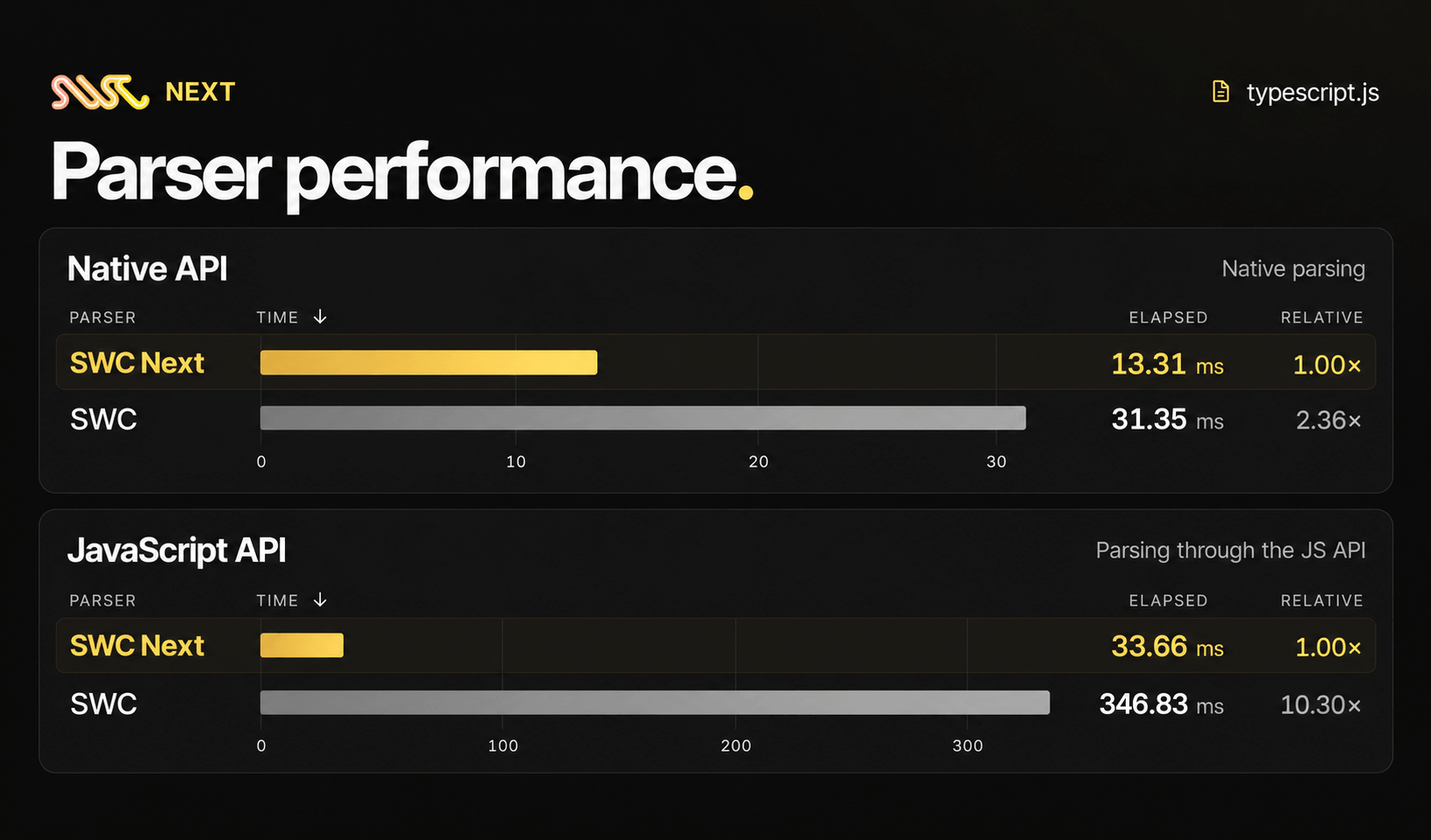
We are gradually migrating SWC's modules to this architecture and replacing Rspack's existing implementations. Rspack 2.3 now uses the SWC Next parser, taking advantage of its more compact AST and memory layout to speed up parsing and traversal.
The following benchmarks compare parsing time and instruction counts in Rspack before and after integrating SWC Next:
The next step for SWC Next is to let developers write high-performance transform plugins in JavaScript. Today, custom code transformations typically rely on Babel plugins or SWC Wasm plugins. We want developers to benefit from Rust's performance while retaining the flexibility of writing plugins in JavaScript.
SWC Next's flat AST enables efficient data exchange between Rust and JavaScript, making this possible. We expect to introduce a loader based on SWC Next, with support for JavaScript transform plugins, in Rspack 2.4 or 2.5.
Performance
Performance improvements
When multiple agents work in parallel, several builds and dev servers may run at once, making memory a significant bottleneck. To address this, Rspack 2.3.0 reduces memory usage during builds and development. The following table compares memory usage (RSS) in a real-world project:
Rspack 2.3 also adds memory snapshots based on allocative to help developers identify memory hotspots during a build. If your project uses a lot of memory, follow the memory diagnostics guide to capture and submit snapshots. We can use them to help identify ways to reduce memory usage.
SWC Next, memory optimizations, and other micro-optimizations also improve overall build performance in Rspack 2.3.0. Benchmarks show an improvement of around 5% compared with 2.2.0, and we have observed gains of up to 20% in some large projects.
SplitChunks optimizations
Large projects often have multiple pages or entry points that depend on many of the same modules. If those modules are bundled into multiple output files, they increase output size and may cause users to download the same code more than once.
To reduce duplication, Rspack 2.3 introduces several optimizations that produce smaller output files:
- The new
splitChunks.dedupDepthoption finds more opportunities to extract modules shared across pages and entry points, reducing duplicate code. It is enabled by default in production mode (dedupDepth: 1). - Support for
splitChunks.minRemainingSizehelps avoid creating tiny output files when splitting code. This can reduce unnecessary network requests and aligns Rspack's behavior with webpack. - Improved module deduplication during code splitting helps reuse existing modules more effectively, reducing duplicate code in output files.
The following table compares the Brotli-compressed output sizes of two large real-world projects before and after enabling dedupDepth: 1:
New cache implementation
Rspack 2.3 introduces a new experimental cache designed to use less disk space, reduce the cost of cache writes, and restore cached results more reliably. It addresses three limitations of the old cache:
- Large cache files and complex restoration: The old cache saved the intermediate state of entire build stages, including relationships between modules. This produced large cache files and made restoration prone to errors. The new cache stores results from individual build tasks, such as module builds, reducing the amount of data saved and the risk of restoration errors.
- Cache writes blocked compilation: The old cache prepared data for disk storage during compilation, adding to build time. The new cache schedules this work during idle time or at the end of a build, reducing interruptions to compilation.
- Limited reuse between development and production: The old cache was closely tied to incremental compilation in development, making some mechanisms difficult to reuse in production builds. The new cache separates these responsibilities and manages memory and disk caches consistently, making it easier to reuse results across different builds and discard entries that are no longer needed.
In benchmarks, the new cache reduced disk usage by around 79% and peak memory during cold builds by around 16%, though warm builds took slightly longer:
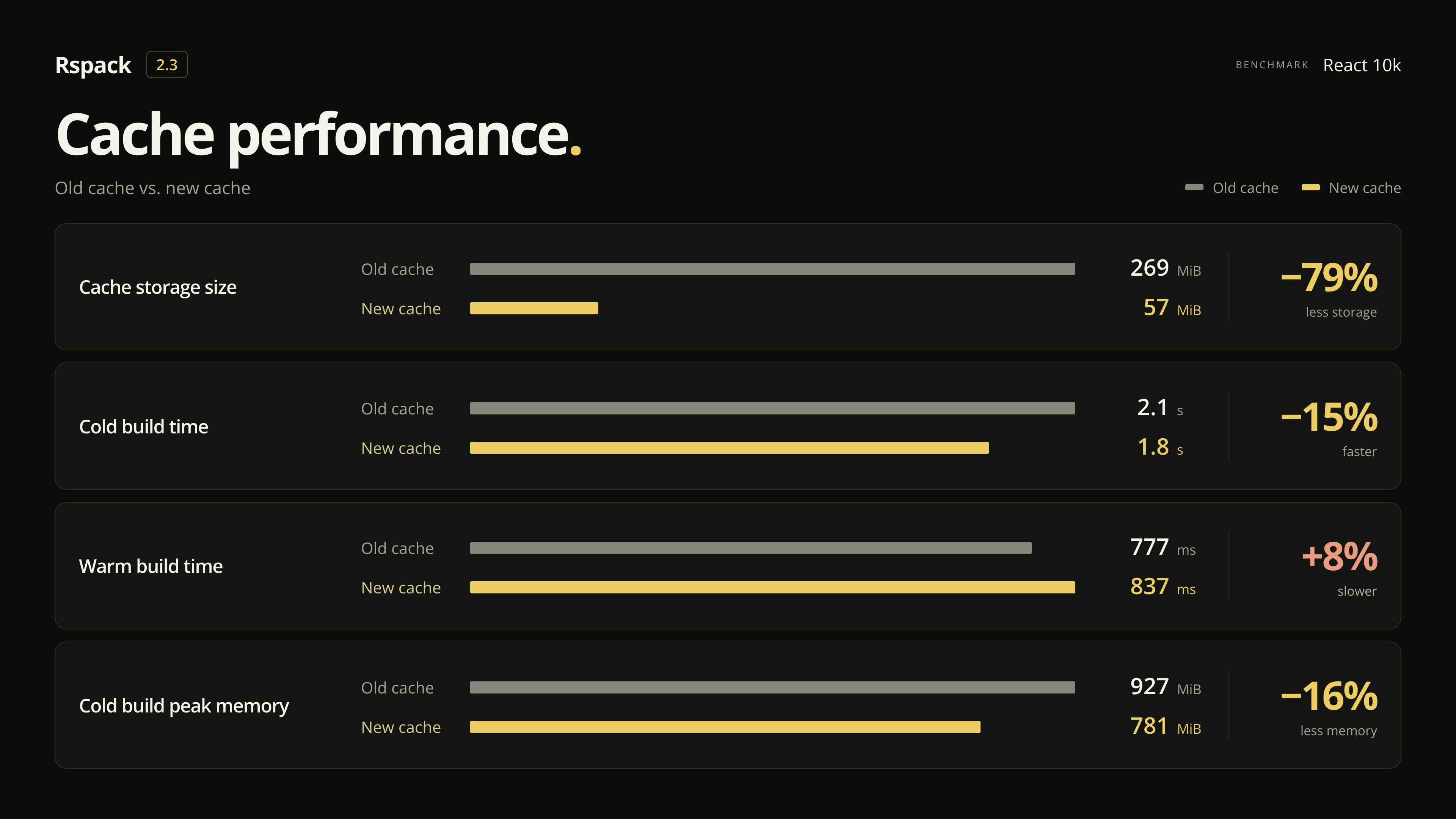
The new cache is disabled by default. Enable it with experiments.newCache:
We will continue optimizing performance in upcoming releases and plan to enable the new cache by default in a future minor release.
Loader cache
With the new cache, you can cache transformation results from individual loaders.
Loader caching is more fine-grained than the overall persistent cache, and each loader can have its own invalidation conditions. A change to your Rspack configuration may invalidate the overall cache while leaving a loader's cached results reusable, as long as its input, configuration, and dependencies have not changed. You may also be able to reuse these results when switching between dev and build modes.
This is especially useful for expensive loaders such as babel-loader and less-loader, which can skip transforming unchanged code to shorten build times.
The following configuration enables the new persistent cache and caches babel-loader results:
In a test using babel-loader to process around 10,000 simulated modules, enabling the loader cache reduced build time to around 11–12 seconds:
New features
Filter loaders by code content
The new module.rules[].use.codeFilter option can skip unnecessary loader transformations based on the code content. For example, you can run a transformation only on files containing a customMacro() call:
Rspack's core is written in Rust, so calling a JavaScript loader adds cross-language communication overhead, even when the code needs no transformation. codeFilter checks the code in Rust first and only calls the loader when a transformation is needed, reducing this overhead.
In a benchmark with 10,000 modules where only 10% needed transformation, codeFilter reduced loader calls by 90% and total build time from 622 ms to 481 ms, a reduction of about 23%.
Built-in CSS
This release improves CSS Modules scoping, composition, value references, and support for nested selectors.
CSS-only entry points
If you publish a standalone theme or style library, you may only need CSS output. Rspack can now bundle a CSS-only entry into a standalone CSS file without emitting an additional JavaScript file. For example:
This configuration emits only one file: styles.css.
CSS externals
When CSS or images are hosted on a CDN or another external service, you may want the browser to load them directly instead of including them in the bundle.
The new css-import and asset-url external types let you exclude resources referenced in CSS from bundling. For example, you can mark stylesheets and an image as external:
Reference these external resources in CSS:
Rspack preserves these @import and url() references in the output without bundling the referenced resources.
CSS @import, url(), and image-set() also support rspackIgnore and webpackIgnore comments, letting you skip bundling specific assets:
Other improvements
- On-demand compilation: Reduces redundant builds triggered when saving code with on-demand compilation enabled, shortening the wait for updates.
- Native watcher: Provides more complete file timestamp information, improving compatibility with tools such as
ts-loader,webpack-virtual-modules, andvue-loader. - Native watcher: Supports functions for
watchOptions.ignoredand improves detection of new directories and deleted or recreated files. - Plugin compatibility and types: Improves compatibility with webpack plugin hooks and refines TypeScript types for loaders, externals, and stats.
- WebAssembly: Adds
output.wasmStreamingFallbackto allow disabling fallback to non-streaming loading.
Ecosystem
Alongside Rspack 2.3, there are updates across the Rstack ecosystem, including Rsbuild, Rslib, Rsdoctor, Rstest, and Rspress.
Rsbuild
TanStack CLI supports Rsbuild
TanStack CLI now officially supports creating TanStack Start projects with Rsbuild. Select Rsbuild with the --build-tool rsbuild flag. For example, to create a React project:
create-rsbuild also adds a TanStack Start option that automatically calls TanStack CLI to create the project. To use this template directly, run:
Lynx Rsbuild plugin
Lynx has introduced @lynx-js/rsbuild-plugin, moving the Lynx-specific options, defaults, and build integration from Rspeedy into pluginLynx. Lynx apps can now build directly with Rsbuild and this plugin, without the Rspeedy wrapper.
You can now use the familiar rsbuild.config.ts and Rsbuild CLI, follow the Rsbuild documentation, and continue using existing Rsbuild and Lynx build plugins.
create-rsbuild also adds a Lynx option that automatically calls @lynx-js/create-lynx to create a project. For example, to create a ReactLynx project with TypeScript:
File size reporting improvements
Rsbuild can now report Brotli-compressed file sizes. You can also set the gzip or Brotli compression level to match your deployment settings for more accurate transfer size estimates. To report Brotli sizes, add:
Other improvements
- Compact-hashed IDs by default: Production builds now use
compact-hashedIDs to reduce output size with shorter, stable module and chunk IDs. - Development experience: When your application includes both client and server code, frontend changes can appear in the browser sooner.
- Public asset directories: Configure
server.publicDirper environment to specify a public asset directory for each environment. - Web Workers: When
output.targetis'web-worker', setoutput.module: trueto generate ES module output. - Host validation:
server.allowedHostsrestricts the hostnames used to access the dev server and preview server. - Preview server: The new
onClosePreviewServerhook lets plugins clean up resources when the preview server closes. - Plugin transforms: Use
codeFilterwithapi.transformto skip unnecessary transformations based on the code content.
Rslib
Rslib 1.0 is now available
Rslib 1.0 has been released. See the Rslib 1.0 release blog for details.
Inline Wasm modules
Rslib now supports inlining Wasm binaries into JavaScript output with ?inline, so you do not need to distribute and load separate .wasm files:
See the Wasm guide for more examples.
TypeScript 7.1 support
Rslib 1.0.4 can generate type declarations with TypeScript 7.1 Beta, including support for its new Content Mappers to handle additional file types.
To use a mapper, install it and register the file extensions it handles in tsconfig.json. For example, a CSS Modules mapper could be configured as follows, using example-css-modules-mapper as a placeholder package name:
When generating type declarations, Rslib automatically loads the mapper to produce types for the class names in your CSS Modules.
Install TypeScript 7.1 Beta to try it:
Rsdoctor
Rsdoctor 2.0 is now available! The Agent CLI is now the recommended way to use Rsdoctor for AI-assisted analysis, with direct access to build data and structured output.
The release also improves Rspack analysis and supports reports for multiple compilers. Installation size is reduced by 56%, analysis time by 57%, and HMR time in development mode by around 47%.
Rstest
Browser mode API improvements
Recent browser mode updates make it easier to test keyboard interactions and React hydration in a real browser:
locator.pressSequentially()types text one character at a time, firing keyboard events for each character. This is useful for autocomplete inputs and other controls that respond to individual keystrokes.render()in@rstest/browser-reactnow acceptshydrateandcreateRootOptions. These let you hydrate existing server-rendered markup in a given container and configure the React root when testing hydration.
Screenshot testing
Rstest 0.12.4 adds visual regression testing to browser mode when using the Playwright provider. The new toMatchScreenshot() matcher compares an element or page against a saved screenshot, helping catch visual changes that DOM assertions alone may miss.
When a comparison fails, Rstest saves the actual screenshot and a diff image for inspection. You can mask dynamic content, configure pixel difference tolerances, and update reference images with --update.
Rspress
Rspress 2.1.0 supports WebMCP by default. Its built-in tools for querying site information, searching documentation, and navigating pages let agents in the browser interact directly with documentation sites.
To try it, run the following code in a browser that supports WebMCP:
You can also register custom tools with the useWebMcp hook to give agents more ways to interact with your site.
See the WebMCP documentation for details.