按需编译
Lazy compilation 是一个提升开发阶段启动性能的有效手段,它采用按需编译模块的方式,而非在启动时编译全部模块。这意味着开发者在启动 dev server 时,可以很快看到应用运行,并分次构建所需的模块。
通过这种按需编译的机制,可以减少不必要的编译时间,且随着项目规模的扩大,编译时间不会显著增长,从而大幅提升开发体验。
Tip
Lazy compilation 仅在开发阶段有效,对于生产构建不会产生影响。
如何使用
Rspack CLI
对于使用 @rspack/cli 的用户,你可以通过 lazyCompilation 配置开启懒编译,假设你正在开发一个包含多页面应用(MPA),当开发其中一个页面时,Rspack 只会构建你当前访问的入口。
rspack.config.mjs
import { defineConfig } from '@rspack/cli';

export default defineConfig({
  entry: {
    Home: './src/Home.js',
    About: './src/About.js',
  },
  lazyCompilation: true,
});
lazyCompilation: true 等价于:
rspack.config.mjs
import { defineConfig } from '@rspack/cli';

export default defineConfig({
  entry: {
    Home: './src/Home.js',
    About: './src/About.js',
  },
  lazyCompilation: {
    // 对入口开启懒编译
    entries: true,
    // 对动态引入的模块开启懒编译
    imports: true,
  },
});
详细配置请参考 lazyCompilation。
Info
当对入口开启懒编译后,入口模块实际上会被异步地动态引入,因此如果你配置了 splitChunks,入口模块会被视为 async chunk,这可能会导致开发环境和生产环境的产物内容有微小差别。
Rsbuild
使用 Rsbuild 的 dev.lazyCompilation 选项开启。
原理
懒编译的原理是将未执行的入口和 Module 的内容改写,当该 Module 在运行时被执行时,会发送请求到开发服务器,随后开发服务器会触发对应 Compiler 的重编译以及模块热更新。
如下图,左边是首次编译的 Home 入口 Module 内容,右图是触发重编译后对应 Module 的内容。
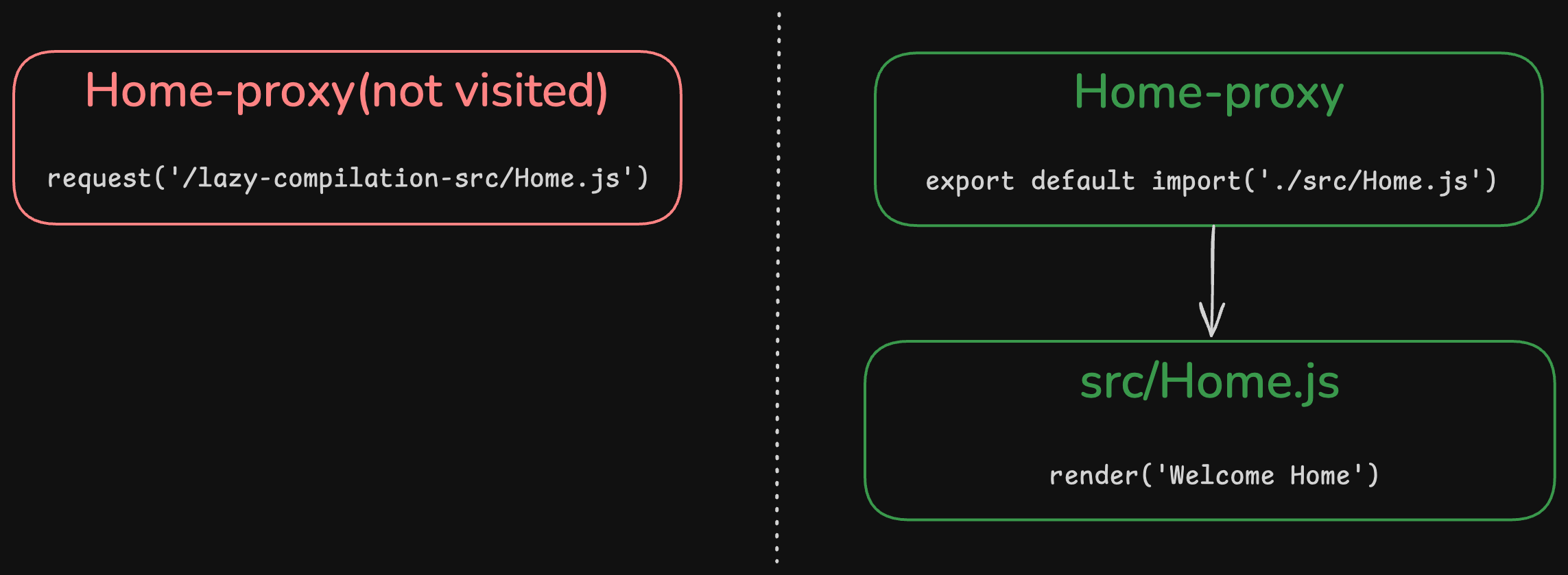
只有当执行对应的入口和模块时,Rspack 才会编译对应的入口和 Module 以及他们的所有依赖。
筛选部分模块
除了 entries 和 imports 选项以外,你也可以使用 test 来筛选哪些模块开启懒编译。
例如,如果你想要避免懒编译 About 入口,可以参考如下配置:
rspack.config.mjs
import { defineConfig } from '@rspack/cli';

export default defineConfig({
  entry: {
    Home: './src/Home.js',
    About: './src/About.js',
  },
  lazyCompilation: {
    entries: true,
    imports: true,
    test(module) {
      const name = module.nameForCondition();
      return name && !/src\/About/.test(name);
    },
  },
});
排除 HMR client
如果你未使用 Rspack 的 dev server,而是使用自己的 server 作为开发服务器,一般会在 entry 配置中加入另外的 client 代码来开启 HMR 等能力,那么最好通过配置 test 来将该 client 模块从懒编译模块中排除出去。
如果不排除掉,并且开启 entry 的懒编译,该 client 在第一次访问页面时不会被编译,因此需要一次额外的刷新才能让其真正生效。
rspack.config.mjs
import { rspack } from '@rspack/core';

const options = {
  lazyCompilation: {
    test(module) {
      const isMyClient = module.nameForCondition().endsWith('dev-client.js');
      // 让 dev-client.js 不被懒编译
      return !isMyClient;
    },
  },
};
const compiler = rspack(options);

new compiler.rspack.EntryPlugin(compiler.context, 'dev-client.js', {
  // name: undefined 代表这是全局 entry,会插入到每一个 entry 前
  name: undefined,
}).apply(compiler);
与自定义的服务器集成
如果你没有使用 Rspack CLI 或 Rsbuild,并且使用自己的开发服务器,你需要手动将 rspack.lazyCompilationMiddleware 集成到你的开发服务器中:
start.mjs
import { rspack } from '@rspack/core';
import config from './rspack.config.mjs';
import DevServer from '@rspack/dev-server';

const compiler = rspack(config);

const middleware = rspack.lazyCompilationMiddleware(compiler);

const server = new DevServer(
  {
    port: 3000,
    setupMiddlewares(other) {
      return [middleware, ...other];
    },
  },
  compiler,
);

server.start();
lazyCompilationMiddleware 接受 1 个参数:
compiler: 当前的 Compiler,使用该 Compiler 对应的 lazyCompilation 配置。
自定义懒编译端点
默认情况下,懒编译中间件使用 /_rspack/lazy/trigger 前缀来处理请求。如果你需要自定义这个前缀,可以使用 prefix 选项:
rspack.config.mjs
import { defineConfig } from '@rspack/cli';

export default defineConfig({
  lazyCompilation: {
    entries: true,
    imports: true,
    // 自定义懒编译端点前缀
    prefix: '/custom-lazy-endpoint-',
  },
});
这在你需要与具有特定路由要求的现有系统集成,或者需要避免前缀冲突时特别有用。

